AI Automation in Business - Where to Start?

Does your company need AI automation?
Before spending money on AI implementation, ask yourself: which processes in your company are repetitive, time-consuming, and rule-based?
If your team spends hours on:
- Responding to similar emails
- Copying data between systems
- Generating reports
- Classifying documents
- Handling repetitive customer queries
...these are ideal candidates for automation.
Where to start? 3 steps
1. Identify repetitive processes
Don't automate everything at once. Start with one process that:
- Takes a lot of time (>2h weekly)
- Is repetitive and predictable
- Has clear input and output
- Doesn't require complex ethical judgment
Good starting examples:
- Email sorting and prioritization
- Extracting data from invoices
- Generating meeting summaries
- Answering customer FAQ
2. Choose the right tools
You don't need to build everything from scratch. Start with ready-made solutions:
| Level | Tools | For whom |
|---|---|---|
| No-code | n8n, Make, Zapier + AI | Non-technical users |
| Low-code | LangChain, Flowise | Developers, analysts |
| Custom | LangGraph, custom API | Advanced cases |
3. Start small, scale gradually
Your first automation should be simple and measurable. Don't build a complex multi-agent system from the start.
Better to have a working automation that saves 2h weekly than a project that will "someday" save 20h.
What does an AI automation flow look like?
A typical automation flow consists of several elements:
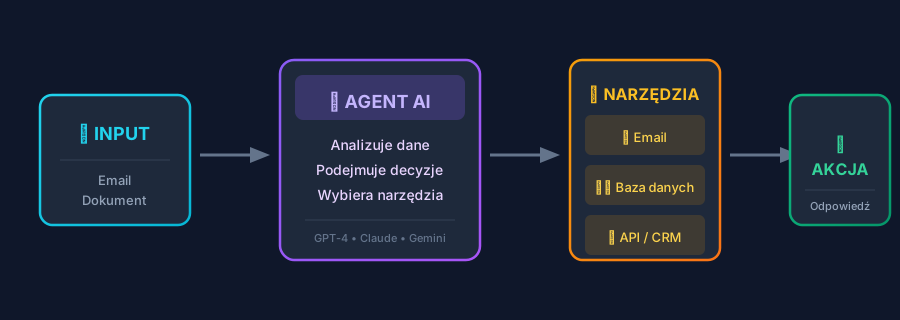
- Input data - email, document, customer query
- AI Agent - analyzes, makes decisions, selects tools
- Tools - email, database, external APIs
- Action - automatic response, CRM update, report
AI automation examples in practice
Automatic email handling
Problem: Support department receives 100+ emails daily. 60% are repetitive questions.
Solution:
- AI classifies incoming emails (urgent/normal, topic)
- Generates draft responses for typical questions
- Human approves or edits before sending
Result: 40% reduction in handling time.
Extracting data from documents
Problem: Accounting manually copies invoice data into the system.
Solution:
- OCR + AI extracts data from PDF
- Validation and filling missing fields
- Automatic import to accounting system
Result: From 15 minutes per invoice to 30 seconds verification.
Meeting summaries
Problem: Meeting notes are chaotic or non-existent.
Solution:
- Meeting transcription (Whisper, AssemblyAI)
- AI generates summary and action items
- Automatic sending to participants
Result: Every meeting has clear summary and tasks.
Common mistakes when implementing AI
1. Automating chaos
If a process is poorly designed, AI will only speed up error generation. First simplify the process, then automate.
2. No human-in-the-loop
Initially, AI should assist, not replace. Add a human verification step, especially in customer-facing processes.
3. Too ambitious scope
"Let's automate all customer service at once" = project that never ends. Start with one use case.
4. Ignoring API costs
LLM calls cost money. With 10,000 requests daily, the bill can surprise you. Calculate ROI before implementation.
What tools to choose?
n8n - workflow automation
Ideal for starting. Visual editor, hundreds of integrations, self-hosting option. Easily connect OpenAI, Anthropic, or local models.
LangChain - for developers
Python/JS framework for building AI applications. Great when you need more control than no-code provides.
LangGraph - advanced flows
When simple chains aren't enough and you need loops, conditions, multiple collaborating agents.
How much does it cost?
Tool costs
- n8n Cloud: from $20/month (self-hosted free)
- Make/Zapier: from $9/month
- OpenAI API: ~$0.002 per 1000 tokens (GPT-4o-mini)
Implementation costs
Simple automation (email, documents): $500-2,500 Medium complexity (multi-source, conditions): $2,500-7,500 Advanced (multi-agent, custom): $7,500-25,000
ROI
If automation saves 10h of work weekly at $25/h rate, that's $1,000/month. Simple automation pays off in 1-3 months.
Next steps
- List processes that take the most time
- Choose one with clear input/output
- Do proof of concept with ready tool (n8n, Make)
- Measure results - how much time do you save?
- Scale to more processes
Learn more
- n8n Documentation - AI Workflows
- LangChain - Getting Started
- OpenAI - Best Practices
- Anthropic - Claude Documentation
Need help with automation? Contact me - I'll help identify processes and propose a solution.